2. User Input File
The stellar input file contains all the metadata required for each star whose spectral energy distribution (SED) you wish to model. In the JSON parameterfile (see the Set-Up page) the file path is described as
['folders']['topdir']/['folders']['supportdir']/StellarInputFiles/user_input_stardata.xlsx
where, in the parameter file, and in the project repo example, it’s
twinkle-master/Inputs_and_Models/StellarInputFiles/user_input_stardata.xlsx.
The input file is an excel file, with a header where each column corresponds to a different meta-data parameter for each star. Each subsequent line contains information for a different star.
You can have multiple sheets in your excel file – maybe you want to have different versions of the same input data. You can specify which sheet you want to use through the ['files']['input_stars_sheet'] parameter in the JSON parameterfile.
Below is a simple stellar input file (broken up for easier viewing, but it would be a 3 row by 20 column file) that includes optical photometric data and some mid-infrared WISE data. You can download the contents of this input file and others here.
MainName
spt
SPT2HIP
NoOptical
model
temp
Star_ID1
A2V
A
FALSE
NextGen
8000
Star_ID2
B5V
F
TRUE
ATLAS9
8000
grav
met
plx
e_Plx
B-V
e_B-V
BJm
BJme
40
0
15.6
0.25
0.07
0.001
5.2
0.01
45
0
20
0.3
0.1
0.001
5.7
0.01
VJm
VJme
W1m
W1me
W2m
W2me
5.1
0.01
4.9
0.07
4.6
0.04
5.9
0.01
6.2
0.07
4.6
0.04
The file shows meta-data for two stars, Star_ID1, and Star_ID2 under the MainName column. All the columns up to e_B-V are not optional. This of course implies that the photometric columns are optional. You don’t technically need to include any photometric bands, besides Johnson B & V but then you wouldn’t get anything modeled. So you SHOULD include SOME photometric bands.
Important
For the moment, one must include the Johnson B and V photometry and uncertainties (BJm, BJme, VJm, VJme).
A full stellar input file can be found in the project repo here. You’ll see a number of different columns that you can use for your simulation. The file Input_StarFile_Description.xlsx (also included in the project repo) contains information for all acceptable meta-data columns in your input stellar file, as well as column Descriptions, Data Type, Units, parameter restrictions, examples of the data, and whether the column is optional for the simulation or not. The image and truncated/scrollable table shows what you’ll find in the Input_StarFile_Description.xlsx file.
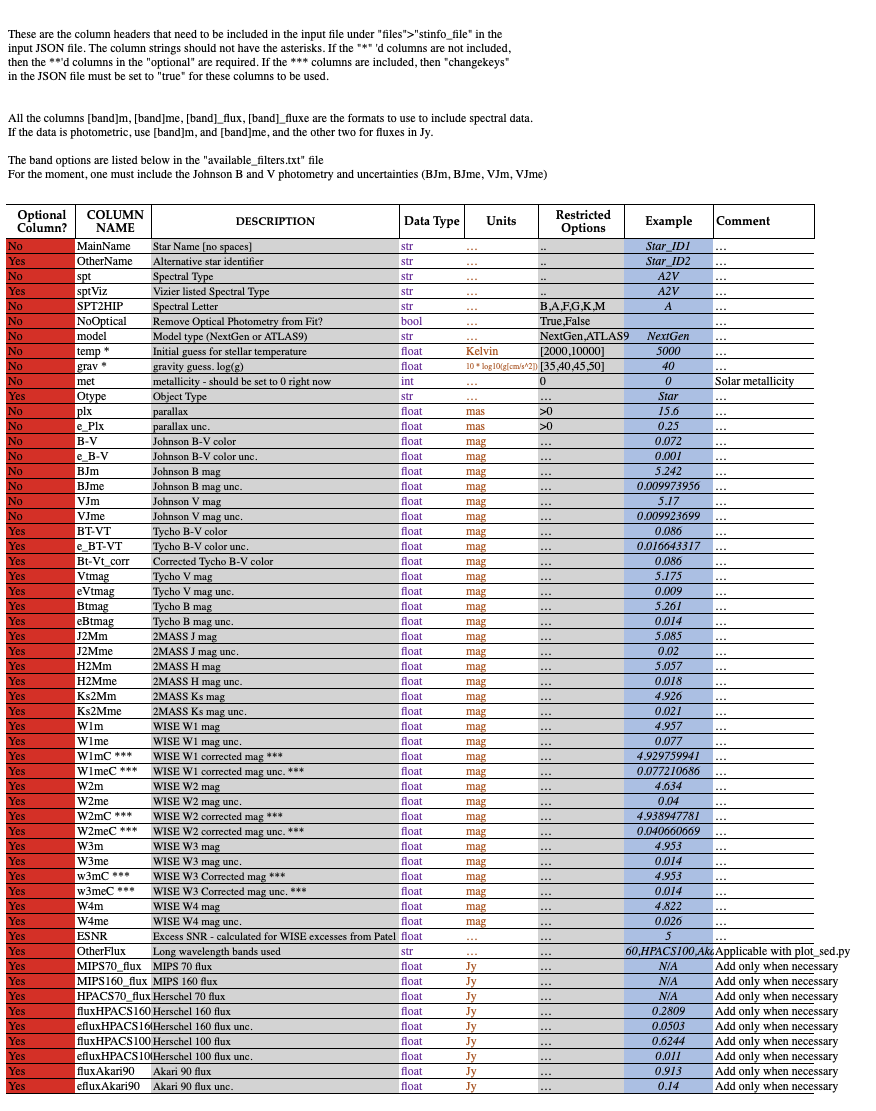
Scroll vertically and horizontally to see the full file.
Optional Column? |
COLUMN NAME |
DESCRIPTION |
Data Type |
Units |
Restricted Options |
Example |
Comment |
|---|---|---|---|---|---|---|---|
No |
MainName |
Star Name [no spaces] |
str |
… |
Star_ID1 |
… |
|
Yes |
OtherName |
Alternative star identifier |
str |
… |
Star_ID2 |
… |
|
No |
spt |
Spectral Type |
str |
… |
A2V |
… |
|
Yes |
sptViz |
Vizier listed Spectral Type |
str |
… |
A2V |
… |
|
No |
SPT2HIP |
Spectral Letter |
str |
… |
B,A,F,G,K,M |
A |
… |
No |
NoOptical |
Remove Optical Photometry from Fit? |
bool |
… |
True,False |
False |
… |
No |
model |
Model type (NextGen or ATLAS9) |
str |
… |
NextGen,ATLAS9 |
NextGen |
… |
No |
temp * |
Initial guess for stellar temperature |
float |
Kelvin |
[2000,10000] |
5000 |
… |
No |
grav * |
gravity guess. log(g) |
float |
10 * log10(g[cm/s^2]) |
[35,40,45,50] |
40 |
… |
No |
met |
metallicity - should be set to 0 right now |
int |
… |
0 |
0 |
Solar metallicity |
Yes |
Otype |
Object Type |
str |
… |
… |
Star |
… |
No |
plx |
parallax |
float |
mas |
>0 |
15.6 |
… |
No |
e_Plx |
parallax unc. |
float |
mas |
>0 |
0.25 |
… |
No |
B-V |
Johnson B-V color |
float |
mag |
… |
0.072 |
… |
No |
e_B-V |
Johnson B-V color unc. |
float |
mag |
… |
0.001 |
… |
No |
BJm |
Johnson B mag |
float |
mag |
… |
5.242 |
… |
No |
BJme |
Johnson B mag unc. |
float |
mag |
… |
0.009973956 |
… |
No |
VJm |
Johnson V mag |
float |
mag |
… |
5.17 |
… |
No |
VJme |
Johnson V mag unc. |
float |
mag |
… |
0.009923699 |
… |
Yes |
BT-VT |
Tycho B-V color |
float |
mag |
… |
0.086 |
… |
Yes |
e_BT-VT |
Tycho B-V color unc. |
float |
mag |
… |
0.016643317 |
… |
Yes |
Bt-Vt_corr |
Corrected Tycho B-V color |
float |
mag |
… |
0.086 |
… |
Yes |
Vtmag |
Tycho V mag |
float |
mag |
… |
5.175 |
… |
Yes |
eVtmag |
Tycho V mag unc. |
float |
mag |
… |
0.009 |
… |
Yes |
Btmag |
Tycho B mag |
float |
mag |
… |
5.261 |
… |
Yes |
eBtmag |
Tycho B mag unc. |
float |
mag |
… |
0.014 |
… |
Yes |
J2Mm |
2MASS J mag |
float |
mag |
… |
5.085 |
… |
Yes |
J2Mme |
2MASS J mag unc. |
float |
mag |
… |
0.02 |
… |
Yes |
H2Mm |
2MASS H mag |
float |
mag |
… |
5.057 |
… |
Yes |
H2Mme |
2MASS H mag unc. |
float |
mag |
… |
0.018 |
… |
Yes |
Ks2Mm |
2MASS Ks mag |
float |
mag |
… |
4.926 |
… |
Yes |
Ks2Mme |
2MASS Ks mag unc. |
float |
mag |
… |
0.021 |
… |
Yes |
W1m |
WISE W1 mag |
float |
mag |
… |
4.957 |
… |
Yes |
W1me |
WISE W1 mag unc. |
float |
mag |
… |
0.077 |
… |
Yes |
float |
mag |
… |
4.929759941 |
… |
||
Yes |
float |
mag |
… |
0.077210686 |
… |
||
Yes |
W2m |
WISE W2 mag |
float |
mag |
… |
4.634 |
… |
Yes |
W2me |
WISE W2 mag unc. |
float |
mag |
… |
0.04 |
… |
Yes |
float |
mag |
… |
4.938947781 |
… |
||
Yes |
float |
mag |
… |
0.040660669 |
… |
||
Yes |
W3m |
WISE W3 mag |
float |
mag |
… |
4.953 |
… |
Yes |
W3me |
WISE W3 mag unc. |
float |
mag |
… |
0.014 |
… |
Yes |
float |
mag |
… |
4.953 |
… |
||
Yes |
float |
mag |
… |
0.014 |
… |
||
Yes |
W4m |
WISE W4 mag |
float |
mag |
… |
4.822 |
… |
Yes |
W4me |
WISE W4 mag unc. |
float |
mag |
… |
0.026 |
… |
Yes |
ESNR |
Excess SNR - calculated for WISE excesses from Patel et al., 2014 |
float |
… |
… |
5 |
… |
Yes |
OtherFlux |
Long wavelength bands used |
str |
… |
… |
HPACS160,HPACS100,Akari90 |
Applicable with plot_sed.py |
Yes |
MIPS70_flux |
MIPS 70 flux |
float |
Jy |
… |
N/A |
Add only when necessary |
Yes |
MIPS160_flux |
MIPS 160 flux |
float |
Jy |
… |
N/A |
Add only when necessary |
Yes |
HPACS70_flux |
Herschel 70 flux |
float |
Jy |
… |
N/A |
Add only when necessary |
Yes |
fluxHPACS160 |
Herschel 160 flux |
float |
Jy |
… |
0.2809 |
Add only when necessary |
Yes |
efluxHPACS160 |
Herschel 160 flux unc. |
float |
Jy |
… |
0.0503 |
Add only when necessary |
Yes |
fluxHPACS100 |
Herschel 100 flux |
float |
Jy |
… |
0.6244 |
Add only when necessary |
Yes |
efluxHPACS100 |
Herschel 100 flux unc. |
float |
Jy |
… |
0.011 |
Add only when necessary |
Yes |
fluxAkari90 |
Akari 90 flux |
float |
Jy |
… |
0.913 |
Add only when necessary |
Yes |
efluxAkari90 |
Akari 90 flux unc. |
float |
Jy |
… |
0.14 |
Add only when necessary |
The photometric bands that can be used to calculate the SED and excess flux are listed in the file located ~/Inputs_and_Models/RSR/available_filters.txt. More information on the relative spectral response (RSR) files can be found on the Model Data Page.
To see what the output of the modeling would look like with different meta-data in the stellar input file, check out the Jupyter Notebook tutorial.
Important
The column strings should not have the asterisks. If the * columns are not included, then the ** columns in the “optional” column are required. If the *** columns are included, then “changekeys” in the JSON file must be set to “true” for these columns to be used.
Important
To include spectral data columns, the parameter names should be in the following format: [band]m, [band]me, [band]_flux, [band]_fluxe. If the data is photometric, use [band]m, and [band]me, and the other two for fluxes in Jy.